Chapter 309 min read
Client access controlv1.0.15+
Identify AI clients calling CCHP with platform-level client definitions, and tighten client permissions layer by layer across three independent evaluation chains (caller, provider group, and provider candidate), with rule locks, revision history, and self-service API key tightening.
CCHP uses Client Definitions and Client Access rules to consistently identify and control the clients calling the gateway (such as Claude Code, Codex, and OpenClaw). The platform first identifies the client from the raw request, then tightens permissions layer by layer across three independent evaluation chains—Caller, Provider Group, and Provider Candidate—controlling which clients may call the platform, use specific provider groups, or be routed to specific providers, provider keys, and endpoints.
Before you begin#
- Client definitions are platform-level settings in Administration → Operations Settings → Client Detection (page title Clients). Only platform super admins can add, delete, reorder, and test them.
- The central entry point for Client Access rules is Administration → System Management → Client Access (
/admin/client-access), where you can switch Effective scope in the header to Global or any supported scope to view and edit rules. Platform-level scopes (Global and organization wildcard) are managed by platform super admins; organization-level scopes are managed by organization admins. - Each entity’s details page also embeds a Client Access section: organizations, teams, users, LLM keys, provider groups, providers, provider keys, and provider endpoints.
Manage client definitions#
Maintain platform-level client definitions in Administration → Operations Settings → Client Detection. Each definition maps a raw client request to a stable client ID.
Built-in presets and three-tier detection engine v1.0.16+#
CCHP includes 111 tested built-in client and official SDK presets (covering Claude Code, Codex, OpenClaw, OpenCode, Hermes Agents, DeepSeek Harness, Cursor, Windsurf, Cline, Roo Code, Kilo Code, Cherry Studio, pi, SillyTavern, and major official SDKs), all bundled with official SVG/PNG/ICO/JPEG icons.
The gateway uses a three-tier App UA first → App System Prompt fallback → SDK fallback detection engine (with single-pass extraction caching and streaming System Prompt reads up to 256 KiB): it matches specific applications by User-Agent and app-specific headers first, then falls back to application System Prompt signatures (for example, Hermes Agents is detected automatically via its System Prompt even without a custom User-Agent), and finally falls back to generic SDK definitions so underlying SDKs never shadow higher-level applications.
- Click Add client to add a custom definition, filling in Name (1–64 characters, case-insensitively unique across the platform), Category (Coding agent, Chat app, Editor plugin, SDK, or Other), Website, Description, Icon, and Match condition.
- Icon: Upload an image or click Fetch from site (automatically retrieves the site icon). The server fetches the icon under outbound egress rules and stores it as an inline
data:URI (PNG, WebP, ICO, JPEG, or sanitized SVG, up to 64 KiB), so the browser never makes requests to third-party icon services while viewing the console. - Ordering: Drag rows to change matching order within the same tier. Within each detection tier, the gateway evaluates enabled definitions in order, and the first matching definition becomes the request’s client; if none matches, the request is classified as Unidentified.
- Disable and restore presets: Turning off Enabled causes requests from that client to be classified as Unidentified (this is allowed even while rules still reference the definition). For modified built-in presets, click Restore preset to reset the name, description, website, category, and match condition (keeping enabled state, order, and icon). Deleted presets can be recovered with Restore presets, and upgrades preserve admin customizations and deletions.
- Delete protection: Before deleting a definition, CCHP checks every tenant across the platform for any client access rules referencing it. If any references exist, deletion is blocked (
409) and a dialog lists every reference so you can clean them up first.
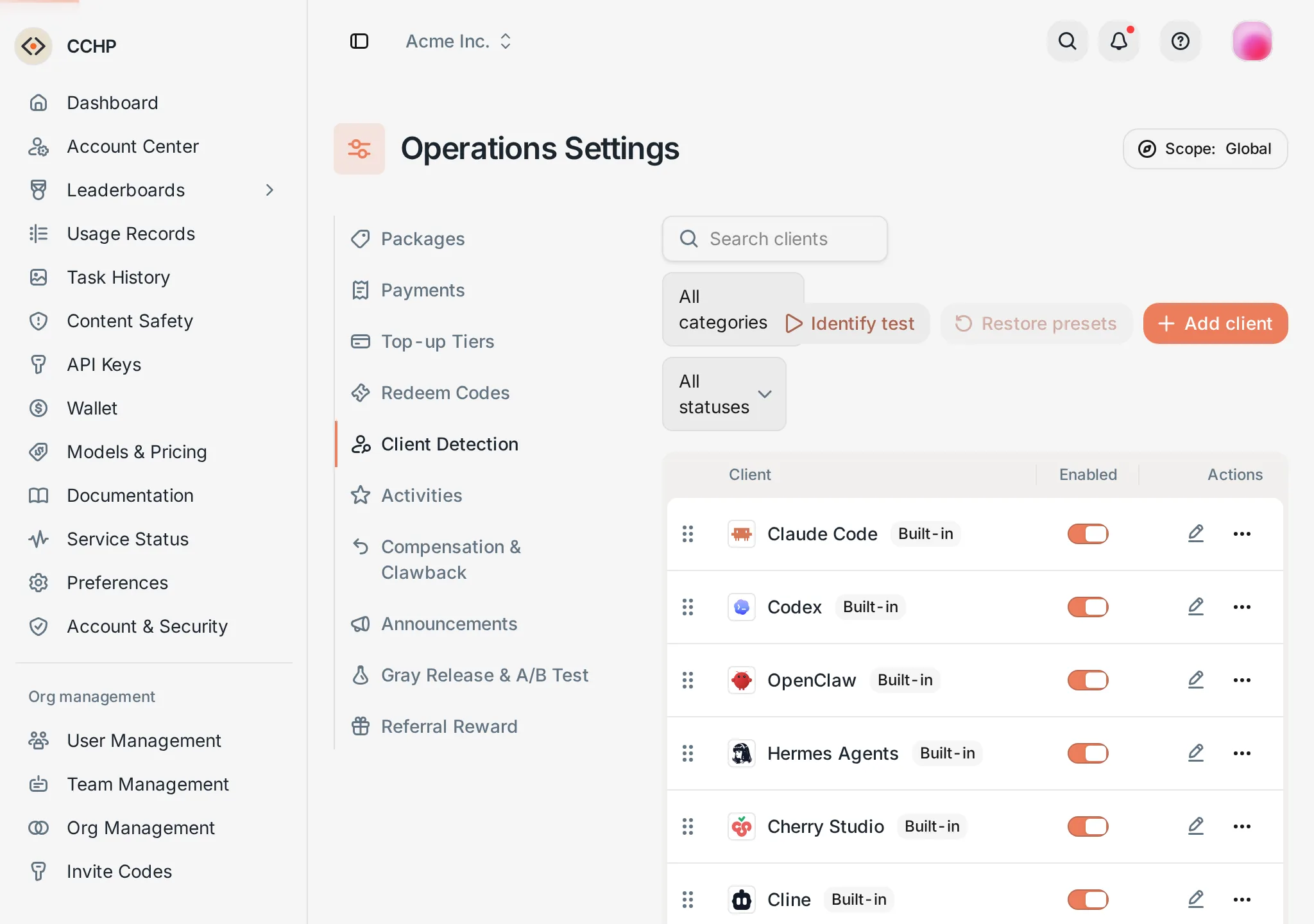 Client definitions: preset client list, category filter, and add button
 CCHP
Condition trees and identification testing#
Match conditions reuse the condition-tree engine from Request/Response Overrides (supporting arbitrarily nested All (AND), Any (OR), and Not (NOT) groups up to 6 levels deep and 128 nodes, with unanchored RE2 regexes), strictly limited to 13 raw request-side fields:
- Raw HTTP fields:
request.method,request.path,request.query,request.header(case-insensitive header names),request.body(supporting JSON paths,*wildcards, and JSON Pointers),request.content_type - Request semantics and inbound catalog fields:
request.operation,request.system_prompt,inbound.protocol,inbound.format,inbound.endpoint,inbound.endpoint_type,inbound.operation
Click Identify test at the top of the page (or Test draft in the edit drawer) to paste a raw request or pick an archived historical request, run it through the exact same matching engine the gateway uses to see which client definition matches, and inspect the evaluation trace of every leaf condition.
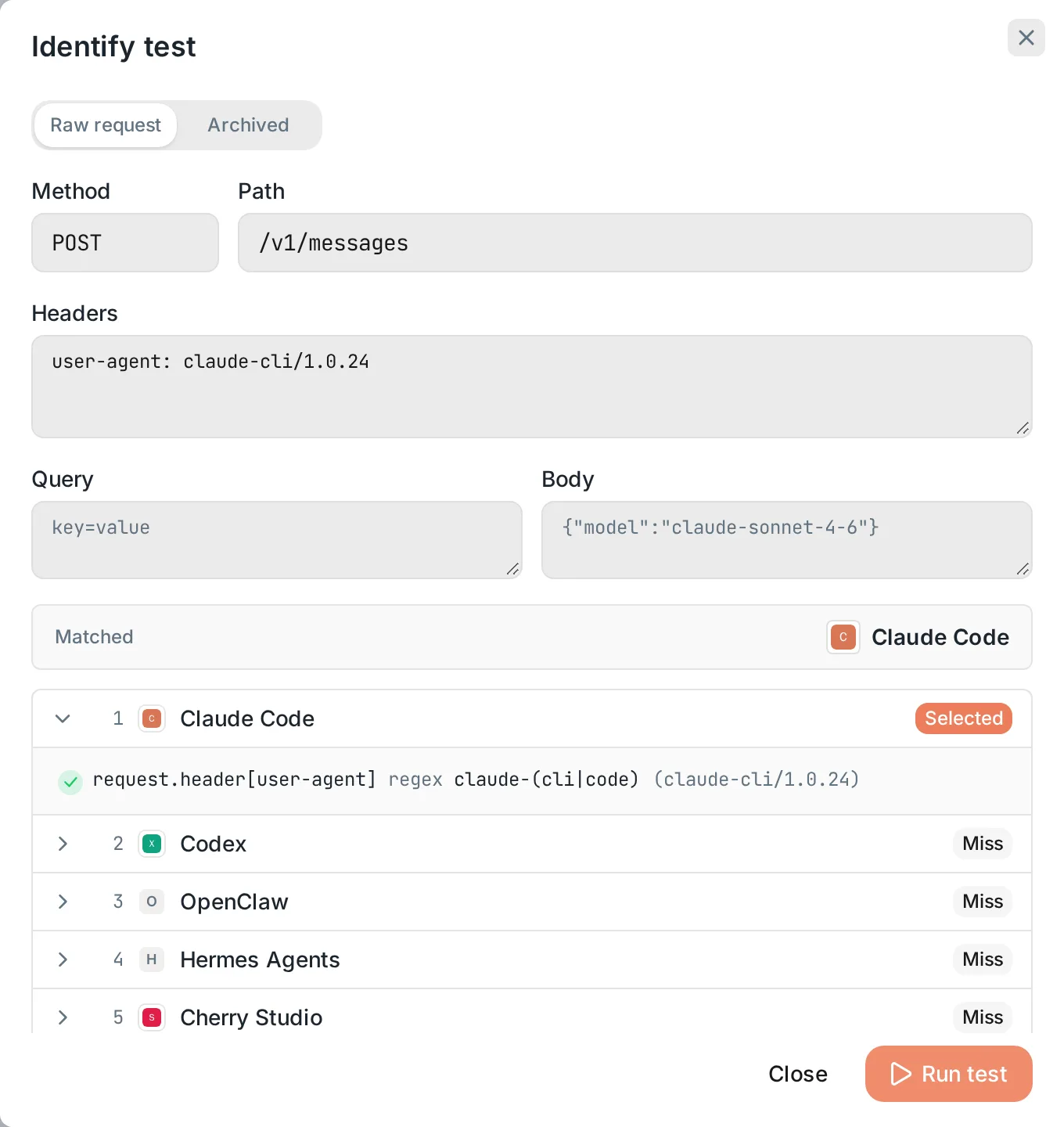 Identify test drawer: test which client definition matches a raw request and inspect condition evaluation tracesCCHP
Client access rules and three evaluation chains#
Client access rules are attached to scopes as rule sets. Each scope’s rule set holds up to 200 rules and retains the last 200 revisions.
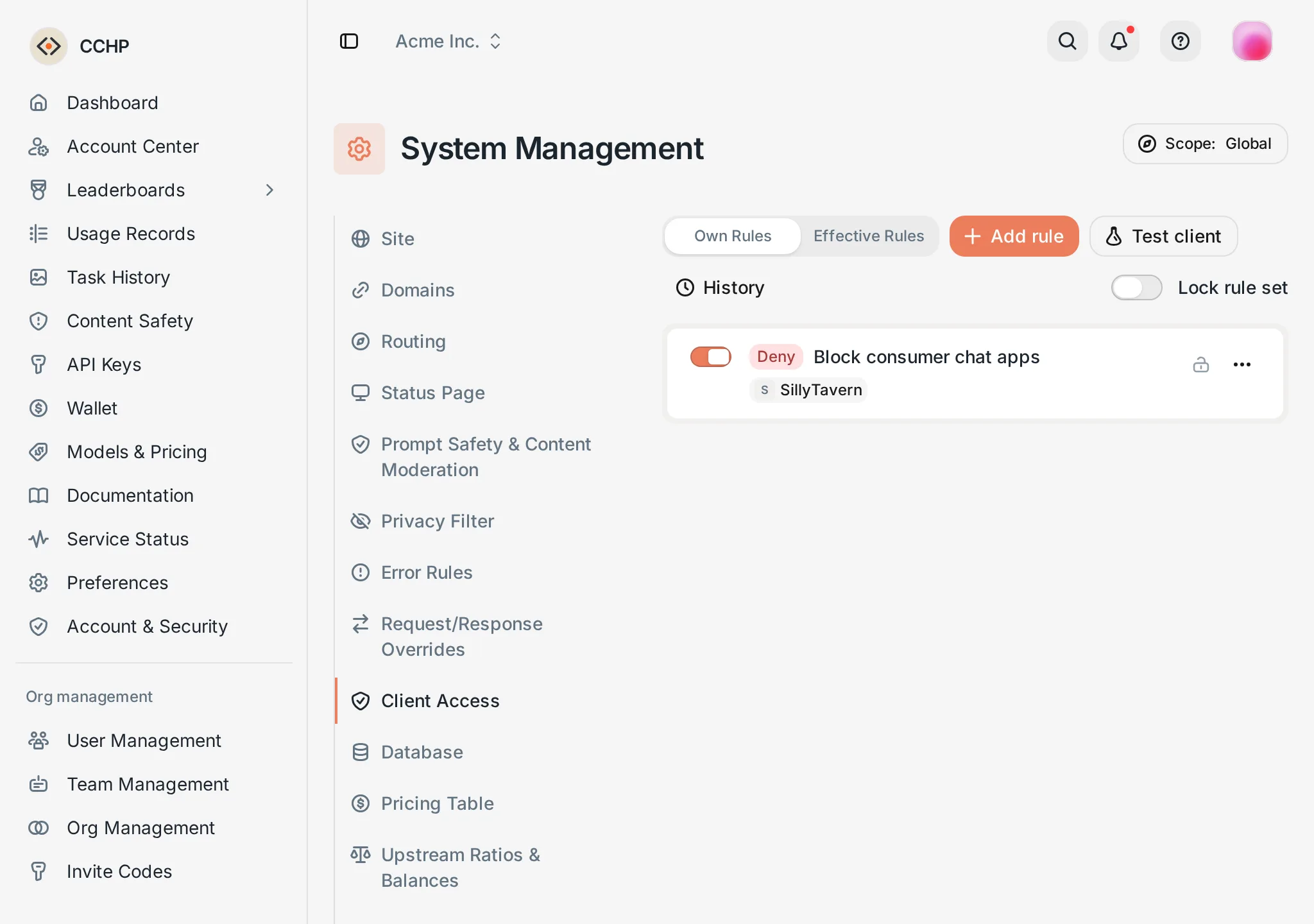 Client Access: scope switcher, allow/deny rule list, and lock controlsCCHP
Each rule has two main parts:
- Action: Allow (
allow) or Deny (deny). - Clients: One or more client definitions, Unidentified, or—for Deny rules—All clients (including unidentified clients, to block all traffic for that scope).
Rules merge from broadest to narrowest along three completely independent evaluation chains (within the same level, wildcard rules apply before specific entity rules). The chains do not interfere with one another, and locks never leak across chains:
Layer-by-layer tightening decision logic#
For the merged effective rules, the gateway decides in this order:
- No active rules: Allowed by default (
unrestricted). - Deny takes precedence: If any active Deny rule matches the client, reject immediately (
denied_by_rule). - Check every layer’s allowlist: Check each layer that has active Allow rules from broadest to narrowest—every such layer must have at least one active allow rule matching the client, or the request is rejected (
not_in_allowlist). - All layers pass: Allowed (
allowed).
Tightening only: Rules added in a narrower scope can only be stricter than upper scopes—you cannot relax an upper-scope allowlist by adding an Allow rule below it (for example, if the organization allows only Claude Code, adding an Allow rule for Codex on a team still gets rejected at the organization layer). To relax an upper-scope rule in a narrower scope, the upper rule must be unlocked, and you disable that inherited rule via a patch using Disable here.
Inheritance, locks, testing, and revision history#
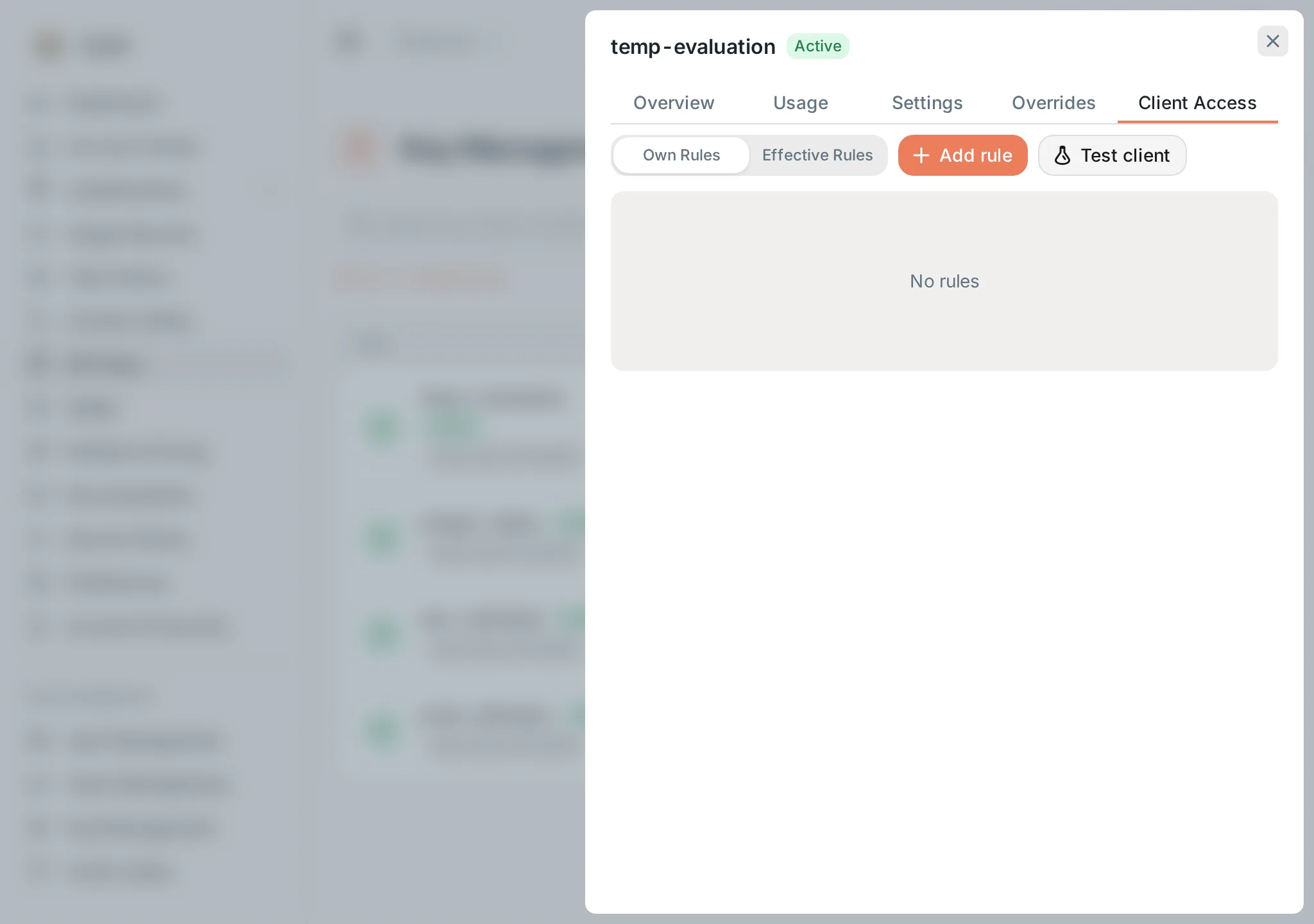
In Administration → System Management → Client Access or in any entity’s Client Access section, you can switch between Own Rules and Effective Rules:
- Inheritance patches: For unlocked rules inherited from an upper scope, you can use Disable here or Re-enable here in a narrower scope without affecting the parent scope or sibling scopes.
- Per-rule lock: Locking a rule prevents any lower scope from disabling or re-enabling it with a patch (disabled rules can also be locked so lower scopes cannot turn them back on).
- Lock rule set: Turning on Lock rule set excludes all lower-scope rules and patches from merging and blocks edits in lower scopes (attempted saves return
409). - Test client: Click Test client, pick any client (or Unidentified), and immediately see the final verdict for the current scope, the reason, and the effective rule breakdown at every layer.
- Revision history and restore: Every save, single-rule toggle, migration, or cleanup automatically creates a snapshot. Each rule set retains its last 200 revisions, which you can compare and restore as a new revision with one click. Deleting a team, user, LLM key, provider group, provider key, or endpoint cleans up its rule set automatically; replacing a provider key’s credential migrates its rule set to the new key automatically.
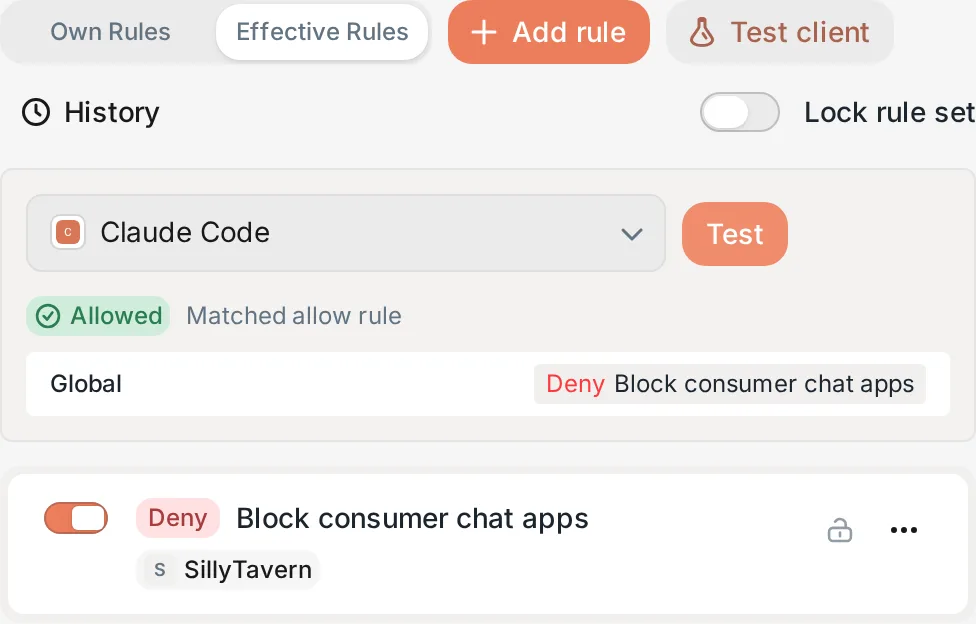 Effective Rules view and Test client: inspect merged layer-by-layer evaluation detailsCCHP
Self-service tightening on user API keys#
Open your LLM key details from API Keys and switch to the Client Access tab to add Allow or Deny rules for that specific key (for example, restricting a key to Claude Code only).
- Security boundary: Regular members only see and edit rules on the key itself—inherited organization and team rules and Effective Rules are hidden, and members cannot override or bypass upper-scope restrictions.
- Streamlined leaf view: Because a user API key is the narrowest layer of the caller chain, its Client Access tab hides revision history and downstream lock toggles, and displays a notice whenever an upper scope is locked.
 LLM key details: self-service tightening rules on the Client Access tabCCHP
Gateway behavior and troubleshooting#
- Single-pass raw-request detection: Once protocol parsing finishes, the gateway identifies the client once from the raw request sent by the client; later inbound overrides or request rebuilds do not change the detected client. The detected client ID is recorded in the
client_idcolumn of request logs and can be referenced asclient.idin Request/Response Override conditions. - Endpoint and cache isolation:
/v1/modelsenforces client detection and all three chains (models served exclusively by excluded groups or candidates are omitted from the list). When any group or candidate is excluded by client rules, response cache and model-list cache entries are automatically isolated by client so results are never mixed across clients. - Task exemption: Querying, downloading, canceling, and deleting already-created async tasks are exempt from client access restrictions.
- Decision-chain troubleshooting: Open any request in Call Records (Usage Records in a platform super admin’s sidebar) and look at the Client Access block on the Decision chain tab to see the detected client, the caller verdict, and any provider groups or candidates excluded by client rules.
Frequently asked questions#
Why does a client still get 403 after I added an “Allow” rule?#
Check two things:
- Click Test client in that scope and inspect Effective Rules for an upper-scope Allow rule that doesn’t include this client or a Deny rule that blocks it. Adding an Allow rule in a child scope cannot relax an upper-scope allowlist.
- Confirm that the client’s requests actually match the expected client definition: run Identify test in Administration → Operations Settings → Client Detection to check whether the request is being classified as Unidentified (for example, OpenClaw or custom clients whose default prompt was removed may need a manual
User-Agentheader when connected to a custom endpoint; Hermes Agents and OpenCode are already detected automatically via System Prompt).
Why does deleting a client definition say it is still referenced?#
Before deleting a definition, CCHP checks rules across every organization on the platform. Click each reference in the dialog to jump to its scope, remove that client from the rule or delete the rule, and then delete the definition. If you only want to stop matching the client temporarily, turn off the definition’s Enabled toggle instead.