Back to Operations settings7 min read
Request and response overridesv1.0.12+
Conditionally rewrite request headers, model names, paths, JSON bodies, and responses across ten scopes from Global to LLM keys, with rule locks, built-in presets, template variables, a rule validator, and hot-reloadable override body size limits.
Request and response overrides let admins and key owners conditionally rewrite headers, model names, paths, query parameters, reasoning settings, system prompts, or JSON bodies across three phases—Inbound, Upstream request, and Response—without changing client code. Earlier request filtering, model redirects, Claude Code client emulation, and outbound header rewriting are all unified into the override rules system.
Entry points and ten scopes#
The central management page is at Administration → System Management → Request/Response Overrides (/admin/overrides). Use the Effective scope switcher in the header to view and edit rule sets at different levels. Individual entity detail pages also embed a Request/Response Overrides section:
- Caller chain: Global → Organization → Team → User → LLM key, plus Package v1.0.15+ (requests paid by that package run its package rules).
- Model and routing chain: Catalog model → Provider group → Provider → Provider key → Provider endpoint (along with whitelist rule deep links).
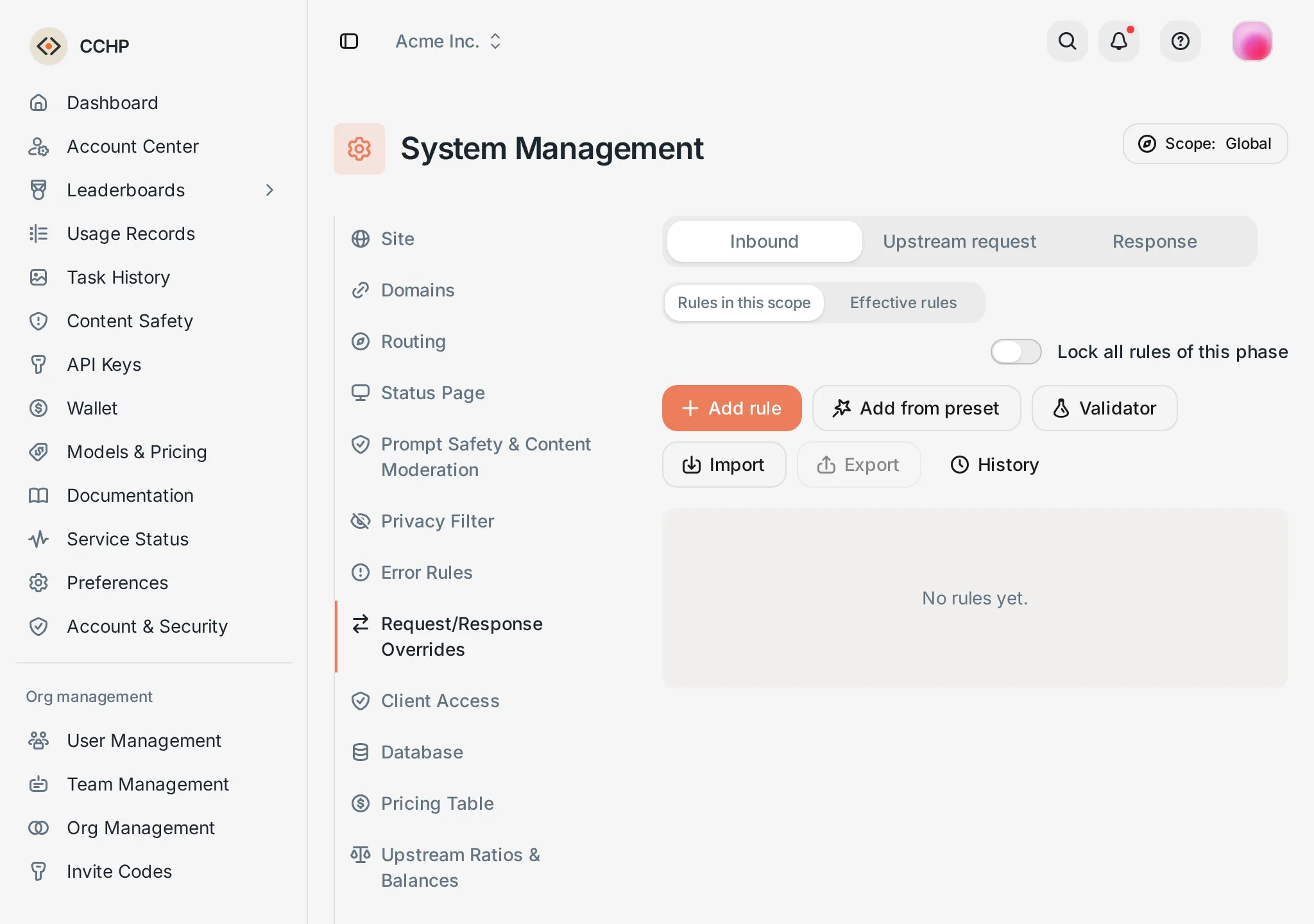 Request/Response Overrides: scope switcher, phase tabs, and rule list
 CCHP
Three execution phases#
Use the segmented control at the top of the page to switch between the three phases, each running at a distinct point in a gateway request:
Inheritance, patches, and locks#
In every scope, you can toggle between Rules in this scope and Effective rules:
- Merge order: Within a phase, rules merge and run from the broadest scope to the narrowest. Narrower scopes can patch inherited unlocked rules (for example, disabling them locally or overriding parameters).
- Per-rule lock and precise conflict diagnostics v1.0.16+: Locking a rule prevents any narrower scope from disabling or modifying it. Rules with disjoint condition domains no longer trigger false-positive ancestor lock conflicts; when a genuine lock conflict occurs (HTTP
409[31502]), the editor displays the conflict type, blocking rule name, and target field, with a one-click jump to the ancestor scope. - Lock all rules: Turning on rule-set locking (Lock all rules of this phase) blocks override rules in narrower scopes—including linked package rules v1.0.15+—from participating in the merge.
- Revision history and import/export: Click History to inspect revisions for the current scope and phase in a timeline view and roll back as needed (with right-click context menu support). Click Import or Export to move rule sets across environments or scopes.
Condition trees, actions, and template variables#
Click Add rule to open the rule editor. Each rule consists of Conditions and Actions:
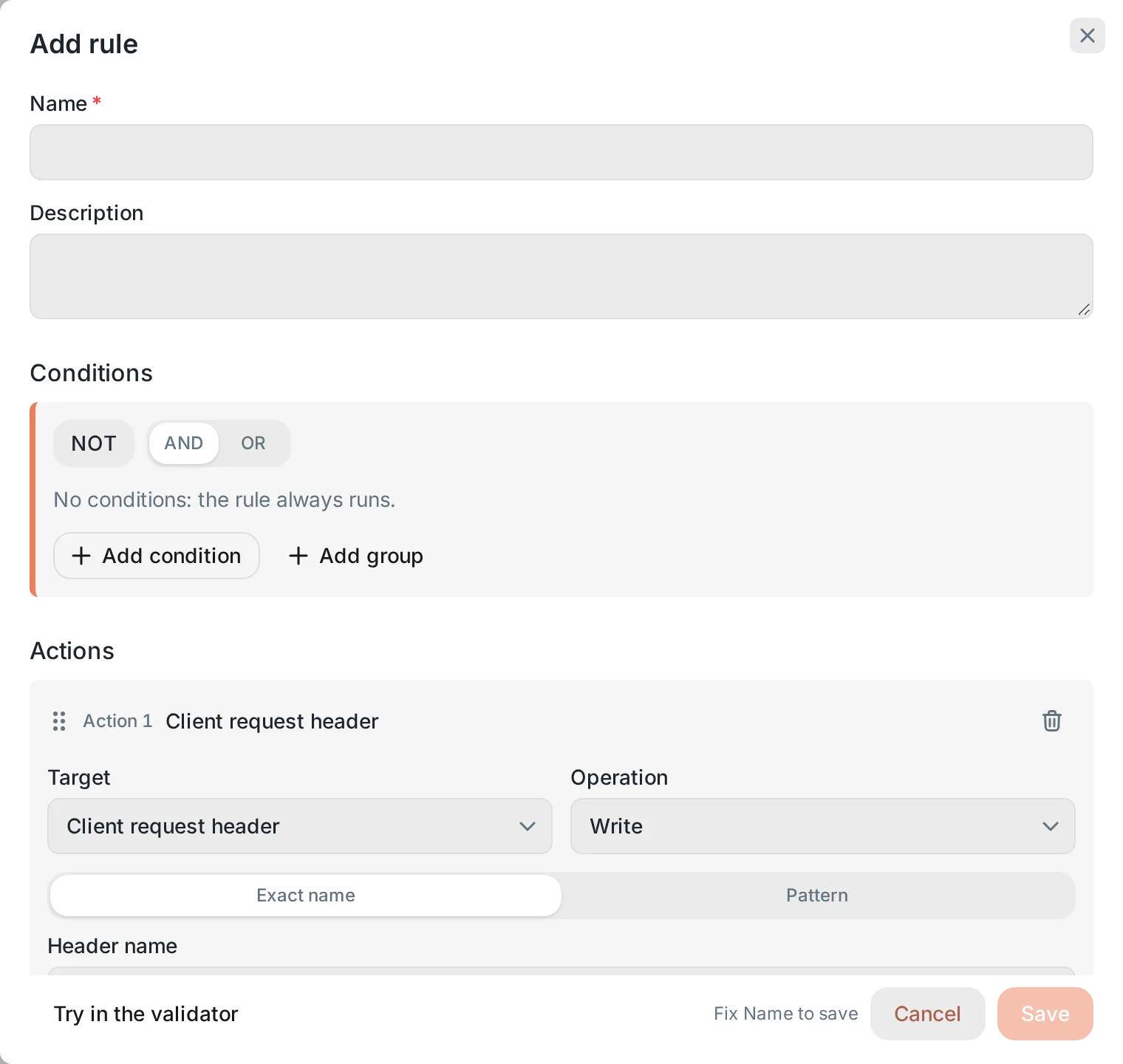 Rule editor: condition tree, field picker, and rewrite actionsCCHP
Condition tree#
Condition trees support arbitrarily nested All (AND), Any (OR), and NOT groups. Supported operators cover equals/not equals, contains/prefix/suffix, glob matching (glob), regular expressions (regex), set membership (in / not_in), CIDR matching (cidr), field existence/absence, numeric comparisons, and JSON type checks (type_is).
Condition fields are grouped by domain:
- Request and client:
request.method,request.path,request.query,request.header,request.body,request.stream,request.body_bytes,request.reasoning_effort,request.system_prompt,client.idv1.0.15+,client.is_claude_code_request,session.id - Model and protocol:
model.requested,model.routed,model.id,model.resolved,model.upstream,model.response,inbound.protocol,inbound.format,outbound.protocol,outbound.format - Identity and routing:
identity.organization,identity.team,identity.user,identity.user_key,identity.packagev1.0.15+,identity.client_ip,route.provider,route.provider_key,route.provider_group,route.endpoint,route.attempt,route.upstream_stream - Upstream and response:
upstream.header,upstream.body,upstream.path,upstream.query,response.status,response.header,response.body,response.event,response.streaming
When a condition checks client.id v1.0.15+, it matches the client ID detected from the original request after protocol parsing (see Client access control), unaffected by later inbound overrides.
Rewrite actions and template functions#
Rewrite targets fall into semantic targets (Model name, Upstream call mode, System prompt, Service tier, Reasoning) and raw structural targets (Client request header / Client request body, Outbound request header / Outbound request body / Outbound path / Outbound query parameter, Response header / Response body, and Plugin action). Supported operations include Write, Remove, Insert, Ensure item, Remove matching items, and Find and replace.
Written values support template variables (referencing request, model, identity, and routing context) and built-in functions: base64, base64url, lower, upper, trim, default, json, and match (to reference regex capture groups during find-and-replace). Protected system headers cannot be rewritten and are logged as protected_header in troubleshooting output.
Built-in presets#
Click Add from preset to apply common templates by filling in a few parameters:
- Model redirect: Conditionally rewrite matching model names to a target upstream model name.
- Default model: Fill in a default model by inbound endpoint type when the client omits the model name.
- Upstream call mode: Force streaming or non-streaming calls to the upstream without changing the response mode sent to the client.
- Service tier override and Reasoning effort override: Automatically translate fields and thinking budgets according to the outbound protocol; preset forms, condition values, and the validator keep canonical English API values (such as
priority,flex,high, andxhigh) across all UI languages to avoid localization ambiguity v1.0.16+. - System prompt: Prepend, append, or replace system prompt text according to the outbound protocol.
- Claude Code client and OpenCode Go headers: Automatically fill in the corresponding client headers, session affinity, and guard blocks.
Rule validator and request troubleshooting#
Click Validator in the toolbar to paste a sample request or pick an archived historical request and test your current draft rules with the exact same engine the gateway runs:
- Enter the sample request on the left (method, path, headers, JSON body, and routing context); the right pane immediately shows the before/after diff along with each rule’s match status and reason code (such as
condition_unmatched,blocked_by_ancestor_lock,body_too_large, orfield_unavailable). - For live troubleshooting, open a request in Request logs, tracing, and leaderboards and check the Decision chain tab in the detail drawer or Decisions & conversion in the trace view to see every override rule that ran and why any were skipped.
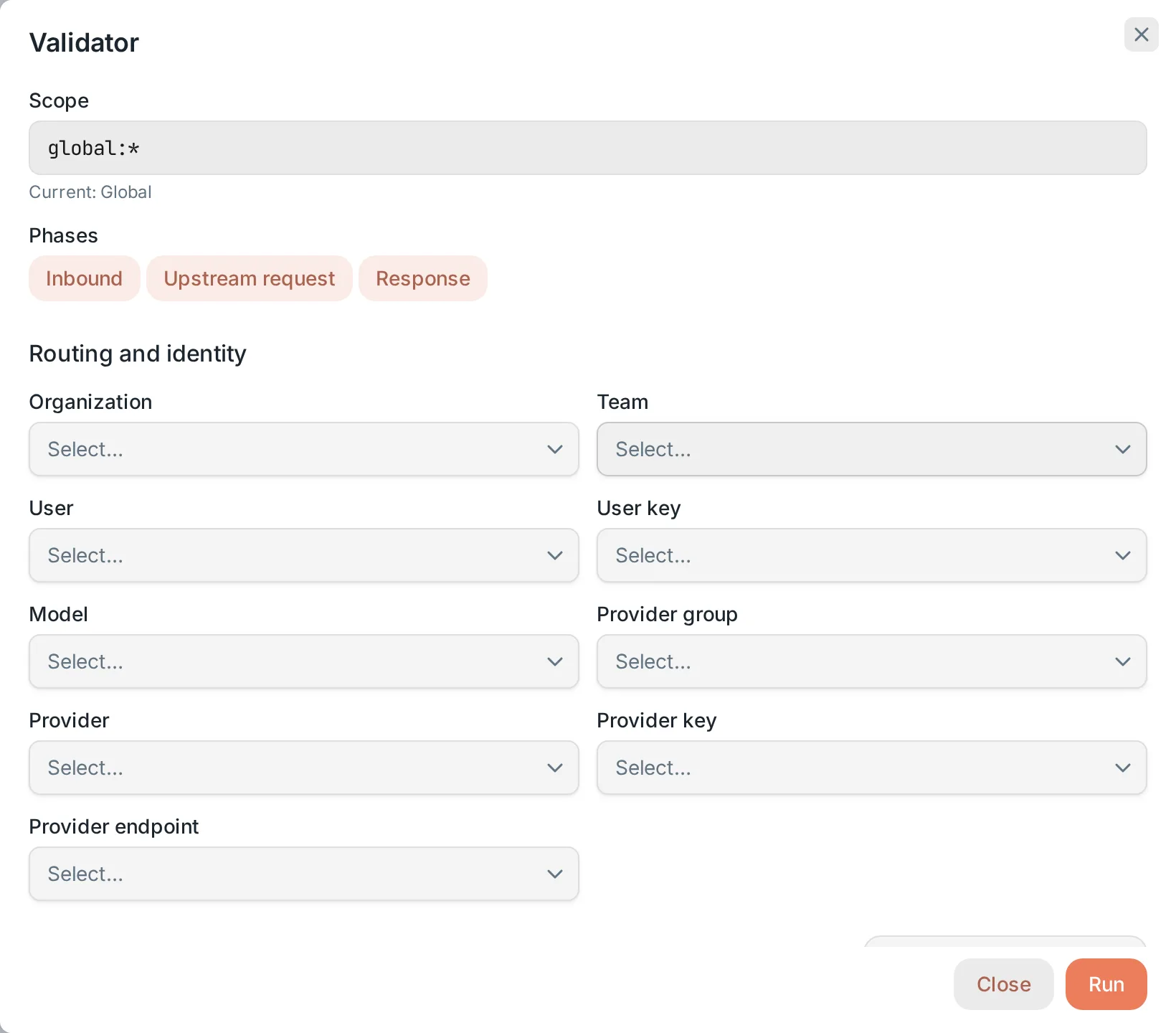 Rule validator: sample run and before/after diffCCHP
Override body size limits v1.0.15+#
To keep oversized request or response bodies from consuming excessive gateway memory during parsing and rewriting, platform super admins can configure hot-reloadable override body size caps under Administration → System Management → Routing → Routing Lifecycle:
The rule editor no longer blocks saving values over 8 KiB with a hard error, showing non-blocking guidance instead. Non-JSON payloads (such as multipart speech transcription, binary audio, or media jobs) automatically skip JSON body rewrites without failing.
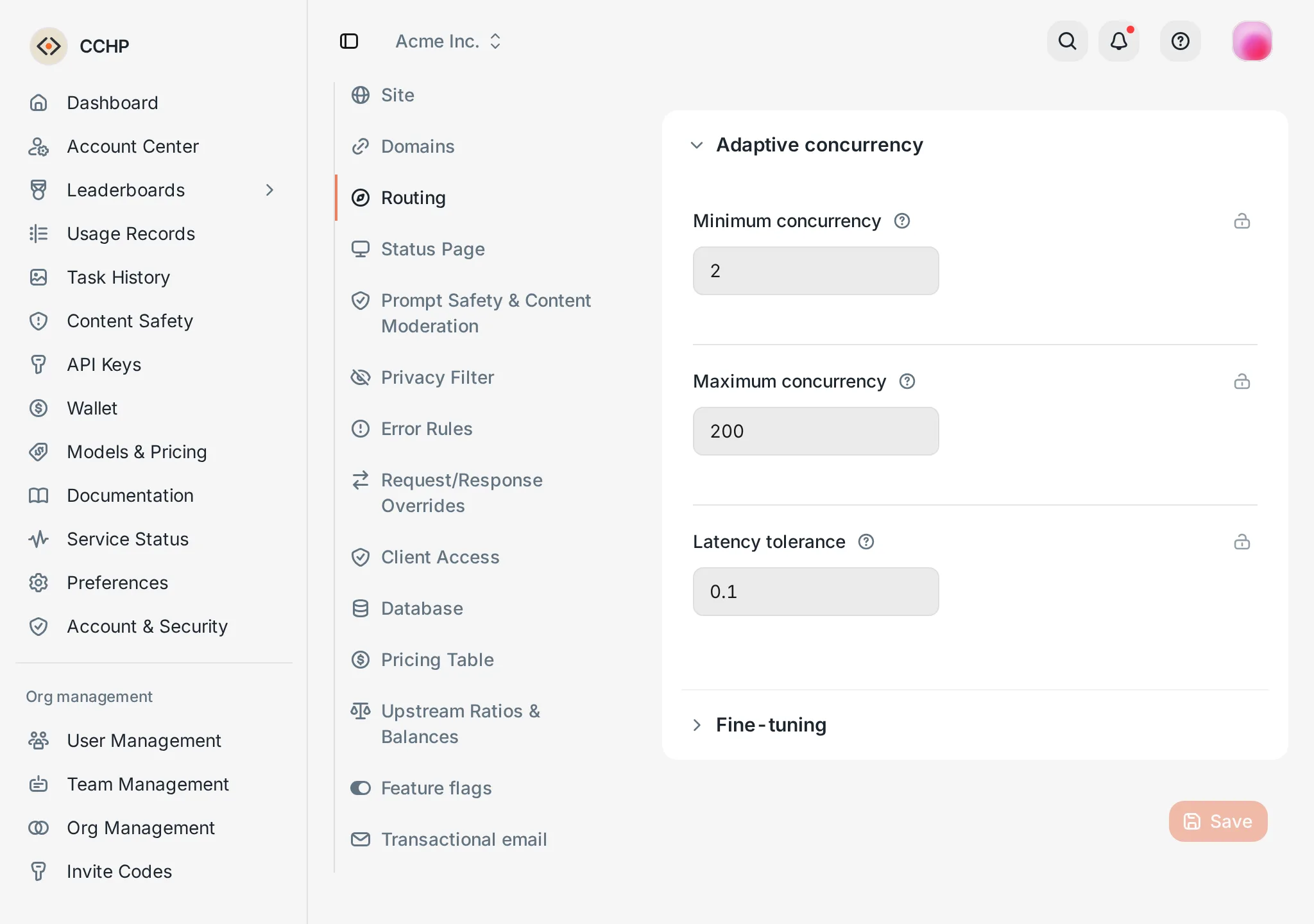 Routing Lifecycle: request/response override body size limitsCCHP
Frequently asked questions#
My rule is saved—why didn’t it apply to the target request?#
Check in order:
- Confirm the rule is in the right Phase (for example, rewriting headers sent to an upstream belongs in Upstream request, not Inbound).
- Switch to Effective rules and check whether a wider-scope rule lock or Lock all rules of this phase blocked it (reason code
blocked_by_ancestor_lock). - If only the body rewrite was skipped, check the request details for
request_override_body_size_limit_exceeded(exceededmax_request_body_bytes).
Can regular members configure overrides for their own LLM keys?#
Yes. Open your LLM key details in API Keys and switch to the Overrides tab to add rules for that key. However, if a parent organization, team, or Global scope has locked a rule or turned on Lock all rules of this phase, the upper-scope rules take precedence and cannot be bypassed.