Back to Prompt safety and content moderation6 min read
Privacy filter and bidirectional obfuscation
Automatically detect and replace emails, phone numbers, ID numbers, and API keys before requests go upstream, with bidirectional format-preserving obfuscation and lossless restoration, observability and archive retention policies, custom rules, live testing, and a high-availability local encrypted cache.
The privacy filter automatically detects and replaces sensitive data—personally identifiable information (PII), private keys, API keys, JWTs, and high-entropy credentials—before requests are sent to upstream providers or written to observability platforms and request archives. Starting in v1.0.14, the privacy filter supports bidirectional format-preserving obfuscation: sensitive values are replaced with format-matching surrogates before going upstream and losslessly restored to their original values in responses returned to the client (including streaming SSE chunks).
Whether or not the privacy filter is on, authentication credentials in request headers are always stripped from archives and logs.
Turn on the feature flag and master toggle#
The privacy filter is a Beta capability governed by a feature flag. It is off by default on a fresh installation and requires two steps to enable:
Turn on Privacy filter in Feature flags v1.0.12+#
Go to Administration → System Management → Advanced Settings → Feature flags (/admin/advanced; legacy /admin/feature-flags redirects automatically), turn on Privacy filter (feature.privacy_filter), enter a change reason, and confirm. The change takes effect across the cluster within 5 seconds, and the Privacy Filter tab appears in System Management.
Turn on the master Privacy filtering toggle in Global scope#
Switch to Administration → System Management → Privacy Filter (/admin/privacy), confirm that Effective scope in the header is Global, and turn on the Privacy filtering master toggle at the top. This toggle applies to the whole deployment and takes effect immediately without clicking Save at the bottom.
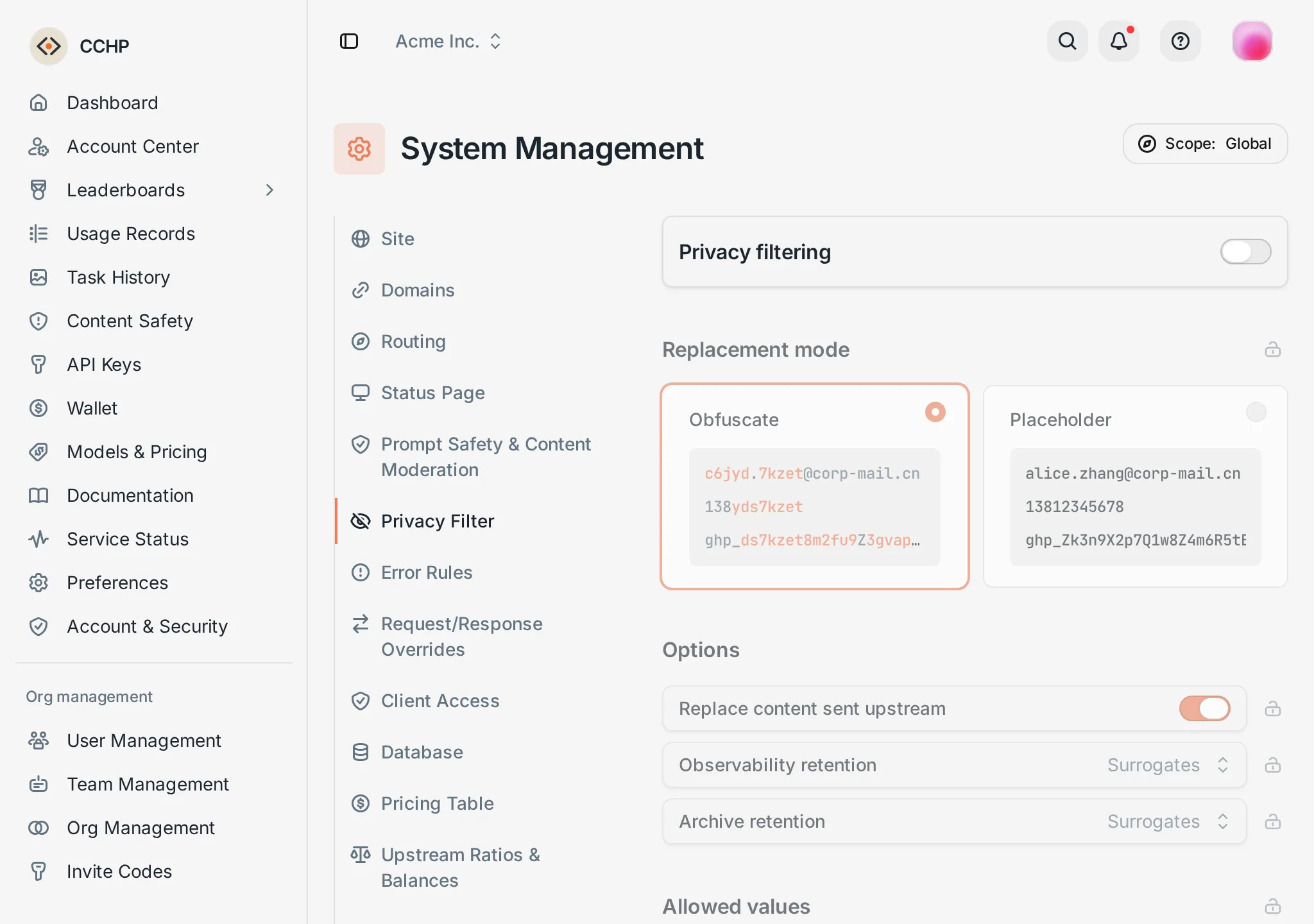 Privacy Filter: master toggle, replacement mode cards, and retention options
 CCHP
Replacement modes: bidirectional obfuscation and placeholders v1.0.14+#
In the Replacement mode section, choose between two modes (overridable across 10 scopes, including Global, organization, team, user, and provider):
- Session-level consistency: Within the same conversation scope, identical sensitive values map to the same surrogate so entity references remain consistent across multi-turn context. Values with adjacent prefixes or suffixes (such as
provider:<uuid>,<uuid>.json, oraddr:<ipv6>) are also restored accurately v1.0.15+. - High-availability local encrypted cache v1.0.15+: When bidirectional obfuscation is enabled, mappings are persisted in the privacy mapping database. If that database becomes temporarily unreachable, the gateway encrypts and buffers new mappings on local disk so traffic keeps flowing and restoration stays intact, flushing them back automatically once the database recovers.
Retention options, scope locks, and user key toggle#
Use the Options section to control where redaction applies and what gets retained. On each row, use the menu on the right to Restore inheritance or click the lock icon to Lock the setting (preventing narrower scopes from overriding it):
- Replace content sent upstream: Controls whether request bodies sent to upstream providers are redacted. When on and unlocked, members can turn it off per key under Settings → Privacy filter for upstream requests in their LLM key details. To enforce redaction across an entire organization or team, lock this row with the lock icon.
- Observability retention: Controls whether requests and responses exported to observability platforms store Surrogates or Originals.
- Archive retention: Controls whether request archives store Surrogates, Originals, or Both.
Setting Observability retention or Archive retention to Originals or Both requires the privacy_settings:manage permission. Admins without this permission can only keep the currently saved value or switch it to Surrogates only.
Allowed values, rule catalog, and custom rules#
The middle of the page provides Allowed values and Rules sections; save any changes through the bottom save bar with confirmation:
- Allowed values: Add fixed values that should never be redacted (such as public example email addresses or test placeholder tokens). Matching content is skipped.
- Built-in and community rule sources: The rule catalog combines CCHP’s built-in PII rules (Email, Phone number, IPv4 address / IPv6 address, MAC address, UUID, JWT, Private key, ID card number, Bank card number, Password, Secret, and more, backed by Luhn checks, prefix validation, and high-entropy detection) with secret rules from gitleaks and betterleaks. Filter by source or type, toggle rules individually or in bulk, or edit a rule’s pattern and type.
- Custom rules: Click New rule, enter a Name, a Go regular expression (capture groups supported), and a Type (starts with an uppercase letter; uppercase letters, digits, and underscores only; up to 32 characters), and test it right away with Try it inside the drawer. Custom rules union upward across scopes, and each rule belongs to the scope where it was created.
- Import or export: Click Import or export at the top right to export the current scope’s privacy rules as a JSON settings file, or load a file into your draft in another organization or environment after previewing the diff.
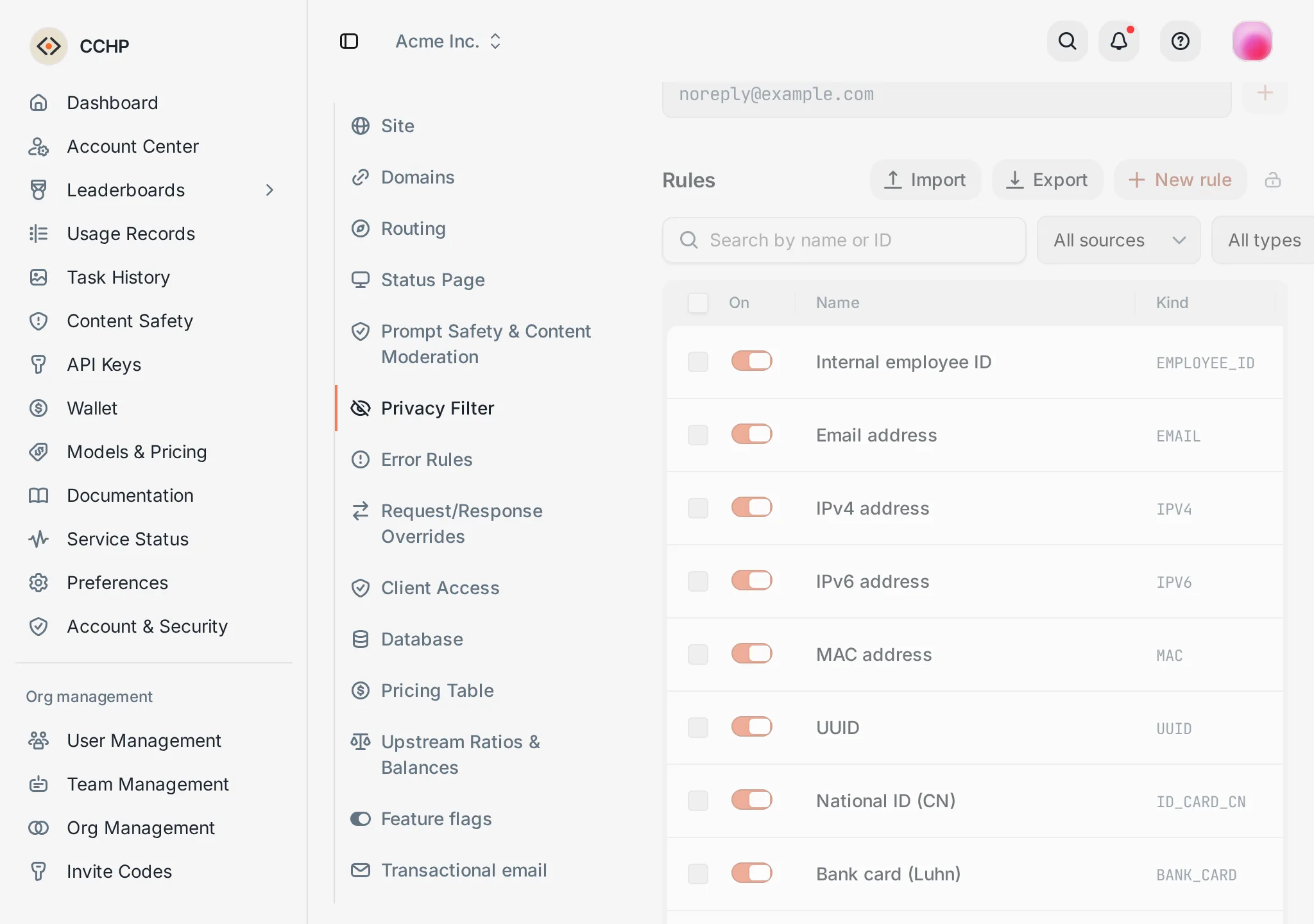 Privacy Filter: allowed values, rule catalog, and filter toolbarCCHP
Live filter testing and request detail inspection#
The Test section at the bottom runs the exact same detection engine as the gateway against your page’s current draft settings (including unsaved edits):
- Paste sample text containing emails, phone numbers, or keys into Text to test.
- Click Run.
- The panel highlights every matched rule and span below, and shows the actual obfuscated surrogate or placeholder output on the Sent upstream line.
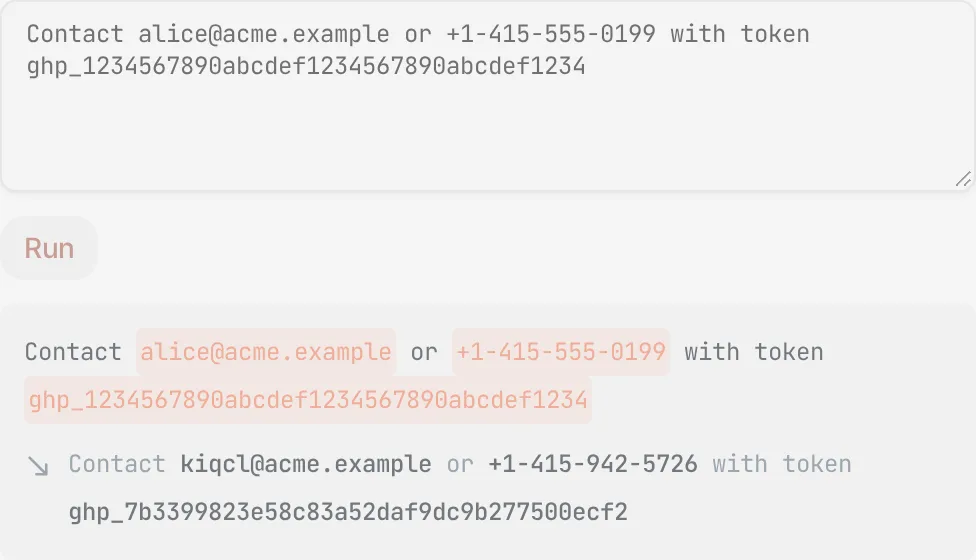 Privacy Filter: live filter test and sent-upstream surrogate previewCCHP
For live troubleshooting, use the Privacy filter quick filter in Request logs, tracing, and leaderboards to list only requests that matched privacy rules. Open a request’s details to view the Privacy filter card, which reports the replacement mode, scope, mapping count (including newly created entries), restoration statistics (including streaming tail-buffer counts and any unrestored notations), and retention settings.
Frequently asked questions#
Why don’t I see the “Privacy Filter” tab in System Management?#
The privacy filter is gated by a feature flag. Go to Administration → System Management → Advanced Settings → Feature flags, turn on Privacy filter (feature.privacy_filter), wait 5 seconds, and refresh. Turning the feature flag off keeps your saved rules and settings intact so they take effect again if you re-enable it.
What happens if a custom rule shows a regex compile error?#
If a saved rule has a syntax error (such as backreferences or lookarounds unsupported by RE2), a warning banner appears above the rule table and requests evaluated with that configuration fail validation. Verify every custom rule with Try it in the rule drawer before saving.
Does the privacy filter interrupt streaming responses?#
No. During streaming forwarding, the gateway buffers only a tiny trailing tail when a chunk boundary might split a surrogate prefix, restoring and flushing immediately once the match resolves. The Privacy filter section in request details shows how many times streaming tail buffering occurred.