Back to Providers and provider groups4 min read
Gateway web searchv1.0.1+
Connect 11 search provider types including Exa, Tavily, Brave, and SearXNG in Provider Management, and configure web search takeover priority, domain filtering, page fetch, and call limits per provider group.
When a client or model invokes web search (such as Codex’s alpha/search or built-in web_search tools in Anthropic, OpenAI, or Gemini), and the selected upstream provider key does not support native server-side search—or native search fails—the CCHP gateway can take over the search tool call, query administrator-configured external Search providers to search and fetch pages, and feed results back to the model v1.0.3+.
Manage search providers v1.0.3+#
Open Org management → Provider Management → Search providers (/app/providers?tab=searchProviders). Search providers are maintained per organization, separate from LLM providers:
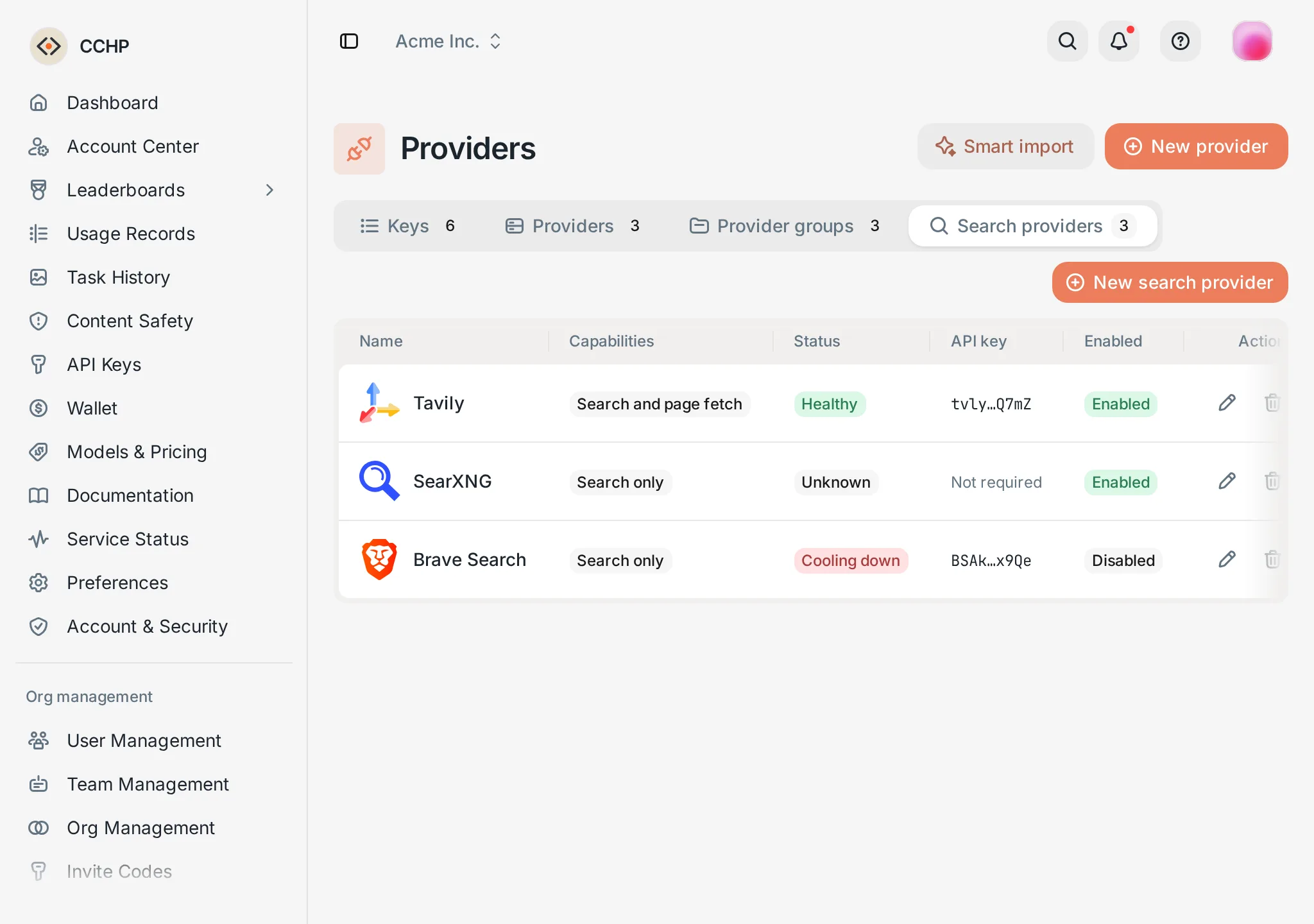 Provider Management: search providers list, capability badges, and health status
 CCHP
Supported 11 search provider types#
When adding a search provider, CCHP ships 11 built-in adapters and displays each adapter’s capability (Search and page fetch or Search only), domain-filter mechanism, time range, locale/language options, and per-call result cap:
Configuration steps:
- Click Add search provider at the top right, choose a provider type, and enter a name, optional Base URL override, API key, and adapter-specific options (such as Exa’s
search_type/contentsor Tavily’ssearch_depth). - Click Test in the drawer and enter a query to verify connectivity, result count, and latency immediately.
- After saving, each row shows a live health badge (Healthy / Degraded / Cooling down / Unknown). Repeated failures place a provider into a brief cooldown and advance automatically to the next candidate in order.
Bind web search to a provider group#
Go to Org management → Provider Management → Provider groups, open the target group, and switch to the Web search tab (/app/providers/groups/<groupId>):
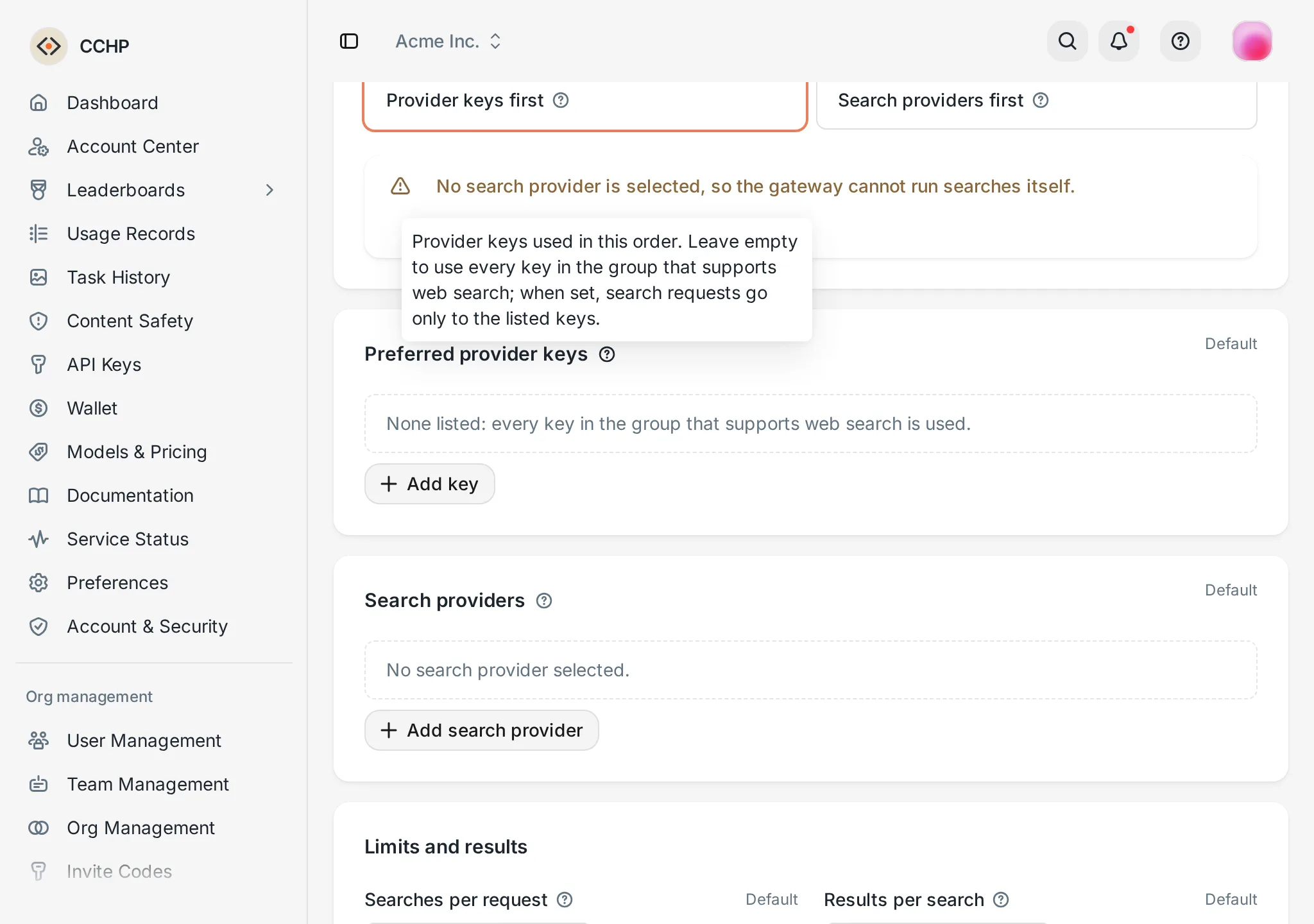 Provider group Web search: takeover mode, provider key and search provider order, and limitsCCHP
Anything not explicitly set on the group inherits from the Organization or Global configuration (labeled Organization setting / Global setting / Default beside each field; click Use inherited to clear the group override).
Two takeover modes#
After turning on Handle web search, pick one of two execution orders:
- Provider keys first (
provider_key_first): Send searches to provider keys in the group that support server-side search first. When no supporting key is available or all of them fail, the gateway takes over and calls the bound search providers. - Search providers first (
search_provider_first): The gateway handles search calls directly through the bound search providers first, falling back to native-search provider keys only when every search provider is unavailable.
In the two lists below, optionally pin which Provider keys participate (leave empty to allow every key in the group that supports web search) and select your Search providers, using Drag to reorder to control attempt priority.
Page fetch, limits, and maintenance policy v1.0.5+#
Configure boundaries and safety controls under Limits and results:
- Page fetch toggle: Controls whether the gateway executes managed page reads (
web_fetch), requiring either a bound search provider with page-fetch capability or the gateway’s safe fetcher. - Max searches and results per request: Caps search loops so a model cannot drive runaway latency or cost.
- Domain allow/block list enforcement v1.0.8+: When requests pass
allowed_domainsorblocked_domains, the gateway applies native provider parameters, query operators, or strict gateway-side post-filtering depending on adapter capability, preventing domain bypasses and SSRF to private networks. - Maintenance and fallback policy v1.0.5+: Defines how requests degrade or error out when search providers are in maintenance or all cooling down, keeping main chat traffic predictable.
Frequently asked questions#
Why didn’t a Codex web search trigger my gateway search provider?#
Check two things: first, confirm that the provider group serving the request has Handle web search turned on in its Web search tab and at least one enabled Search provider bound; second, if the mode is Provider keys first and the upstream key supports native search, the gateway lets the upstream handle it—switch to Search providers first to always route through your external or self-hosted search providers.
Why does a search provider show “Search only” and refuse page fetch?#
Some search APIs return snippets only and do not expose full-page extraction. To support web_fetch, add a provider tagged Search and page fetch (such as Exa, Tavily, Jina, or Firecrawl) to the group’s search provider list.