Back to Organizations vs. teams5 min read
Audit logs and finance events
Search and stream platform and organization audit logs, investigate sensitive actions across system and tenant scopes, and reconcile top-ups, package purchases, redeem codes, and refunds in Finance Events.
CCHP records administrative operations and wallet ledger movements in two dedicated read-only views—Audit Logs and Finance Events. Audit Logs captures every sensitive action taken by administrators, backend services, and cron jobs on configuration, members, keys, permissions, and providers. Finance Events tracks all wallet credits, debits, and billing adjustments outside per-request API charges.
Audit logs#
Audit Logs covers all admin operations, backend configuration publishes, provider changes, sensitive admin actions on members (such as revealing a member’s full LLM key, changing roles or limits, lifting a safety cooldown, or adjusting member billing), operations settings, cron jobs, and backend API errors. Routine self-service API calls by regular users are not written to admin audit logs.
- Platform super admin entry point: Administration → Audit Logs (
/admin/audit) shows events across all organizations as well as platform-level system events. - Organization admin entry point: Org management → Audit Logs (
/app/audit) is strictly scoped to the current organization v1.0.4+.
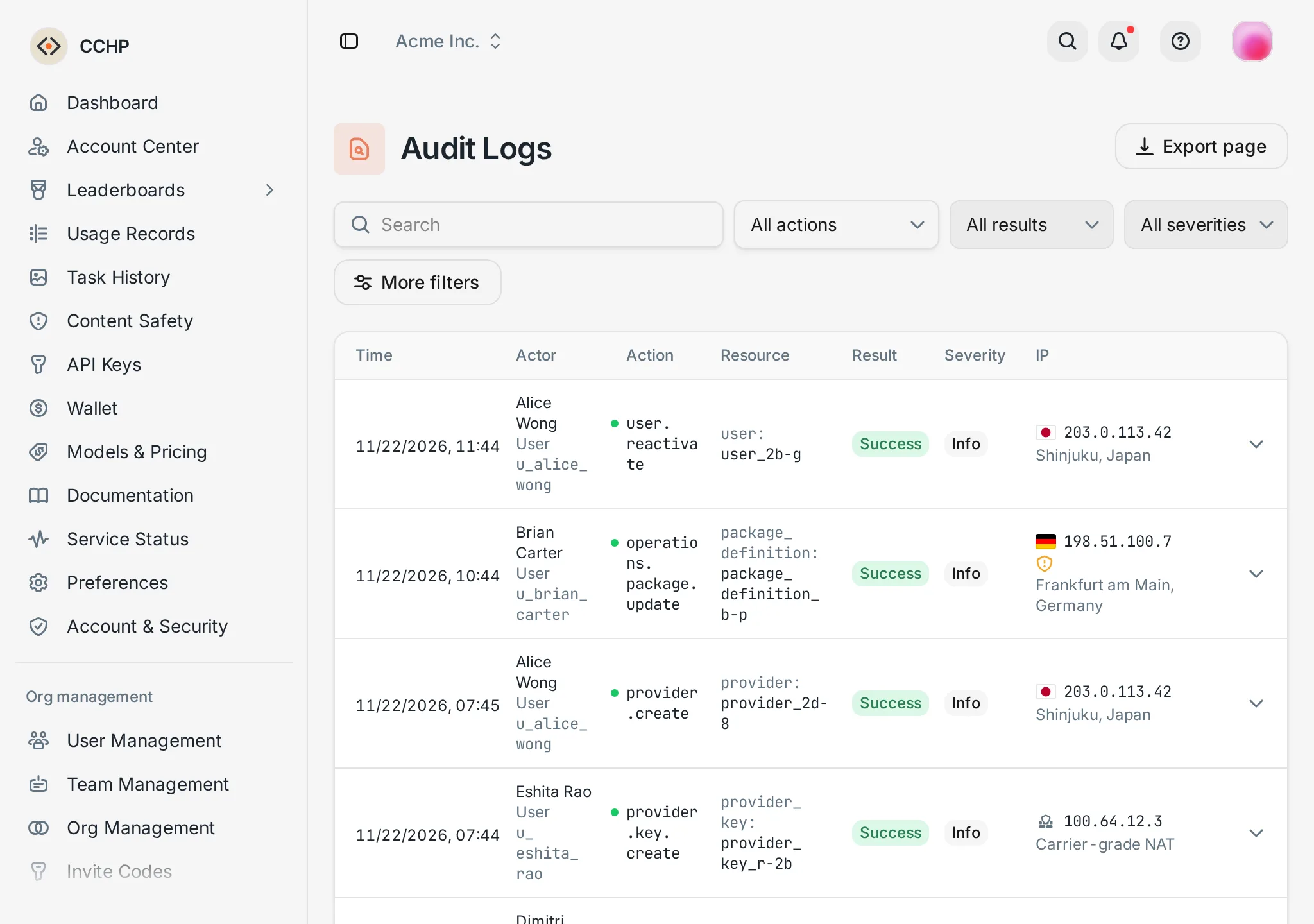 Audit Logs: action categories, result and severity filters, and live event list
 CCHP
Filtering, live updates, and export#
- Quick filters and fully localized action names: The top bar supports fuzzy keyword search, Action categories (two-level menu with all 456 audit action names localized across all 5 console languages v1.0.16+), Result (
success/deny/error/pending), and Severity (info/warn/critical). Expand More filters to combine actor, organization, team, IP address, Request ID, and time range. Every filter is synced to the URL so you can share links or refresh without losing state. - Live stream banner: When you are on page 1 with no active filters, the page subscribes to new audit events in real time. Incoming records queue in a banner at the top (New records: N · Show) and are inserted only when you click it, so rows never jump while you investigate.
- Row details and GeoIP v1.0.15+: Click any row to expand its full payload, including actor ID, target resource, before/after diff, and geolocation details for the source IP. Click Export page at the top to download the current filtered results as JSON for offline retention or incident tickets.
Platform-level audit and the system organization v1.0.10+#
Platform-wide actions—such as toggling feature flags, publishing global routing configuration, switching object storage, updating the GeoIP database, running scheduled cleanup, or editing login providers—are attributed to the reserved system organization:
- Platform super admins can filter Organization to
system(or leave it on all organizations) under More filters on/admin/auditto review platform-wide changes. - Organization admins hold
audit:readstrictly within their own organization and cannot view audit records from other organizations or thesystemorganization v1.0.4+. - The audit log table (
audit_log_v2) is protected data: database storage pressure shrinking never deletes it early, and it is governed solely by its dedicated audit retention and archive policy.
Finance events v1.0.3+#
Finance Events (/app/finance-events) consolidates all member wallet and billing movements—balance top-ups, online and balance package purchases, package renewals, redeem code redemptions, check-in and referral rewards, batch billing corrections, and clawbacks or compensation (per-request LLM API charges remain in Request logs, tracing, and leaderboards).
- Organization admin entry point: Org management → Finance Events (current organization only).
- Platform super admin entry point: Administration → Finance Events (platform-wide context covering all organizations, with an organization filter).
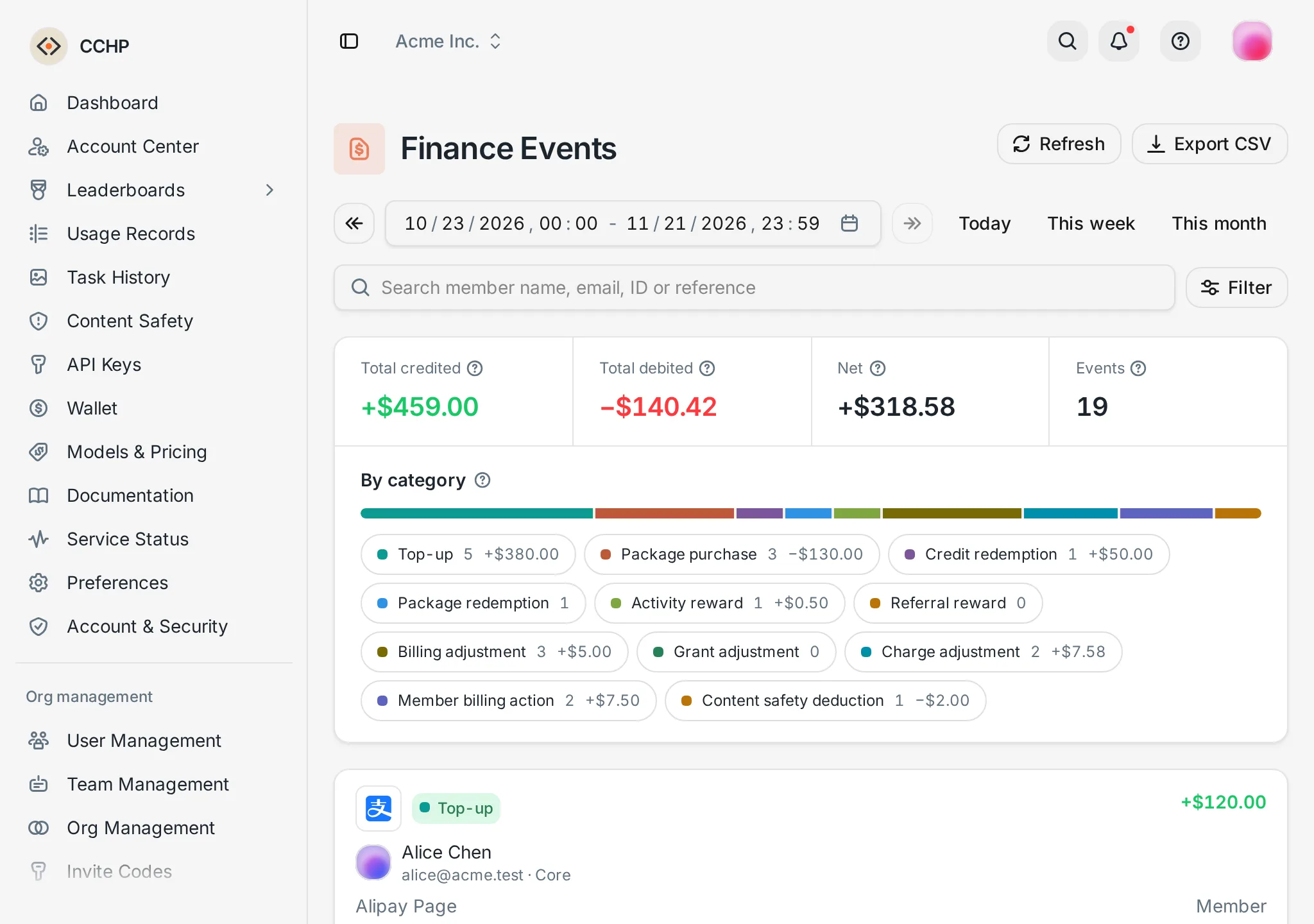 Finance Events: time range, credit and debit summary cards, and categorized ledger tableCCHP
Summary metrics and multi-dimensional filters#
- Top summary bar: Calculates live Credit, Debit, Net, and Events totals for the selected time range, alongside a breakdown bar by event category. Click any category segment in the bar to filter the table immediately.
- Precise filters and CSV export: Filter by preset date range (Today, This week, This month, or custom range), member search, organization (in platform-wide context), event category, direction, and amount range. Click Export CSV to export the filtered ledger rows.
- Package payment entries and self-approval prevention v1.0.15+: Online package purchases and renewals record both the payment credit and the package debit entry in the ledger so reconciliation stays complete. When an admin initiates balance compensation, clawback, or dispute refunds, CCHP blocks self-approval and records the full actor trail.
Event details and audit log cross-linking#
Click any row in Finance Events to open the Event details drawer on the right, showing before/after balances, linked order or package IDs, actor, processing timeline, and notes.
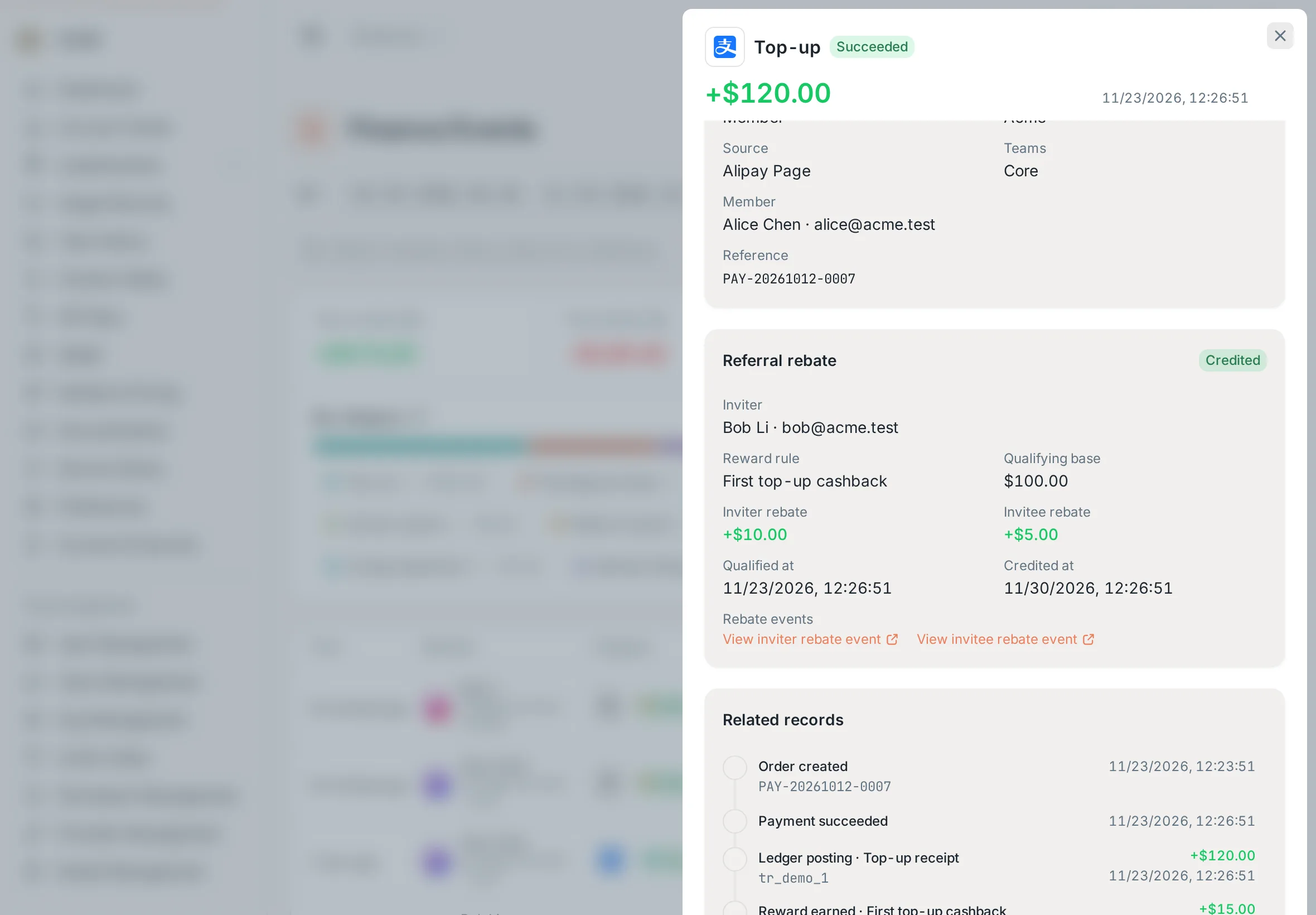 Finance Event details drawer: ledger breakdown and Audit Logs linkCCHP
- Referral rebate details and direct links v1.0.16+: For qualifying non-balance online top-ups, package orders, package purchases, and renewals, the Event details drawer displays a Referral rebate section with inviter/invitee links, reward rule, qualifying base (non-balance paid amount), inviter rebate, invitee rebate, and qualified, expected release, credited, or cancelled timestamps and cancellation reason. The processing timeline highlights the Reward credited step, with one-click View inviter rebate event and View invitee rebate event links for two-way reconciliation.
- Click the Audit Logs link inside the drawer to jump directly to Audit Logs pre-filtered with that resource ID (
?q=<resourceId>), making it easy to match every balance change to the admin action or payment callback behind it. - A user’s own online top-up orders and redemption records live in Wallet, top-ups, and billing (the legacy
/app/ordersroute redirects automatically to/app/wallet).
Frequently asked questions#
Why don’t individual LLM API call charges appear in Finance Events?#
Finance Events focuses on wallet- and package-level funding events (top-ups, package purchases and renewals, redeem codes, engagement rewards, compensation/clawbacks, and batch billing corrections) so financial reconciliation stays readable. To verify token metering, settlement list prices, and per-call charges, see Request logs, tracing, and leaderboards.
Can an organization admin see audit logs for other organizations or global settings?#
No. CCHP enforces tenant isolation at both the permission layer and PostgreSQL Row-Level Security (RLS): organization admins can query only the audit logs and finance events of their own organization, with no access to other tenants or platform-level system audit entries.