Back to Operations settings4 min read
Feature flagsv1.0.12+
Enable or disable Beta and experimental features from the console, review all default-off flags, 5-second cluster-wide propagation, audited change reasons, one-click rollback, plus maintenance mode and console display settings.
CCHP includes a built-in OpenFeature-compatible Feature flags system (with no external flag server required) to govern Beta capabilities at runtime. Platform super admins can open Administration → System Management → Advanced Settings → Feature flags (/admin/advanced; legacy /admin/feature-flags redirects automatically) v1.0.16+ to inspect every registered flag, publish single-flag changes with an audited reason, and manage platform maintenance mode on the same page. Advanced Settings consolidates five operations tabs—Feature flags, Observability, Usage view, Task results, and Performance—as top horizontal sub-tabs and dynamically adjusts the header Effective scope control per active sub-tab.
Registered flags and default-off Beta capabilities#
Under Administration → System Management → Advanced Settings → Feature flags, the list displays each flag’s name, description, lifecycle stage (planned / experimental / beta / ga), configuration key (feature.<name>), and Last change (actor, timestamp, source, and reason), with real-time keyword search:
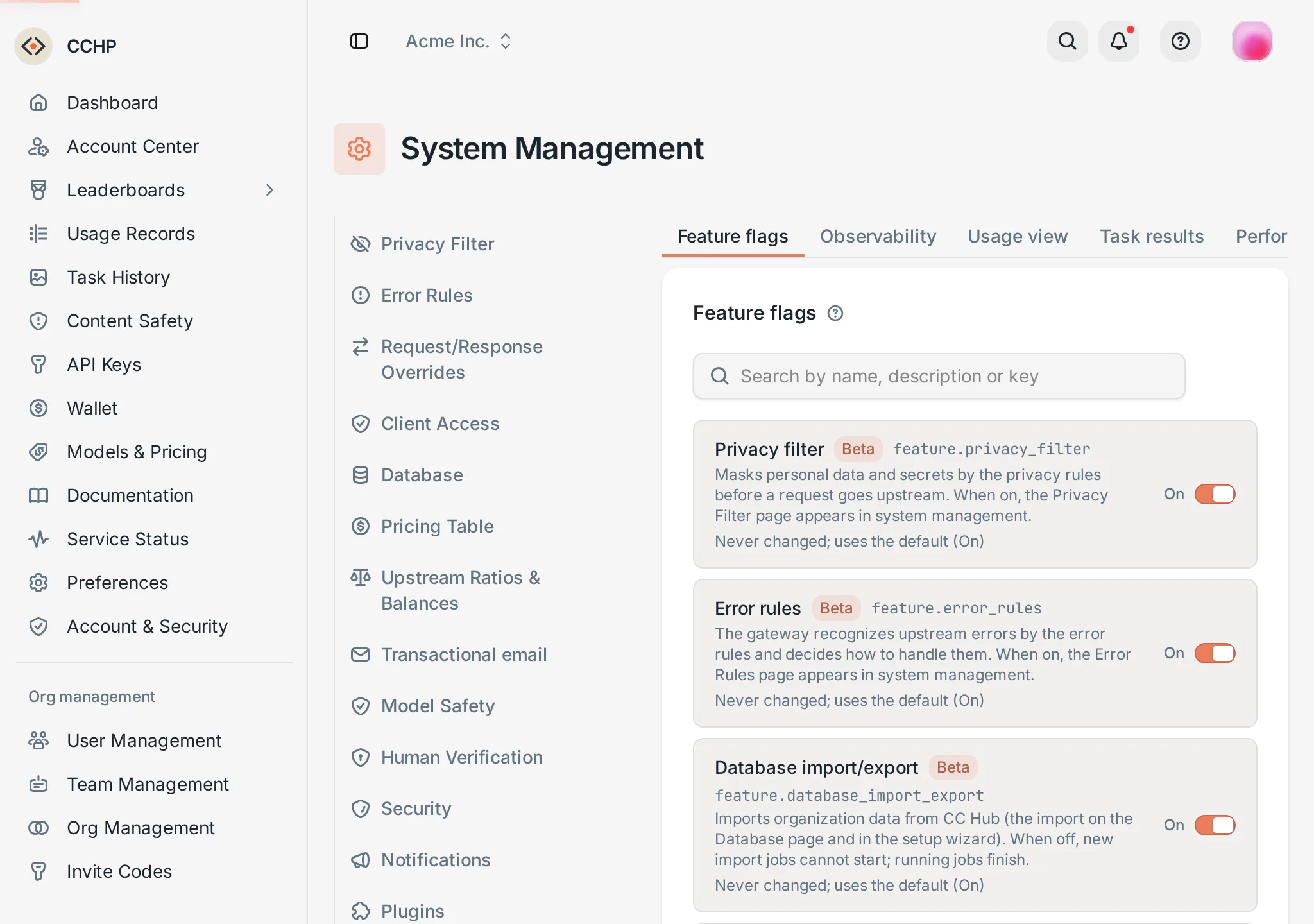 Feature flags: registered flag list, lifecycle badges, last change metadata, and system maintenance section
 CCHP
All 6 built-in flags default to off on a fresh installation:
When upgrading an existing deployment to v1.0.12 or later, the data migration checks whether those capabilities were already in use (for example, privacy filtering turned on, active error rules, model safety tasks, or CC Hub import records) and automatically initializes those flags to enabled so existing workflows are never disrupted.
Toggle confirmation, impact preview, and required audit reason#
Clicking the action button on any toggleable flag never applies silently—it opens a confirmation dialog:
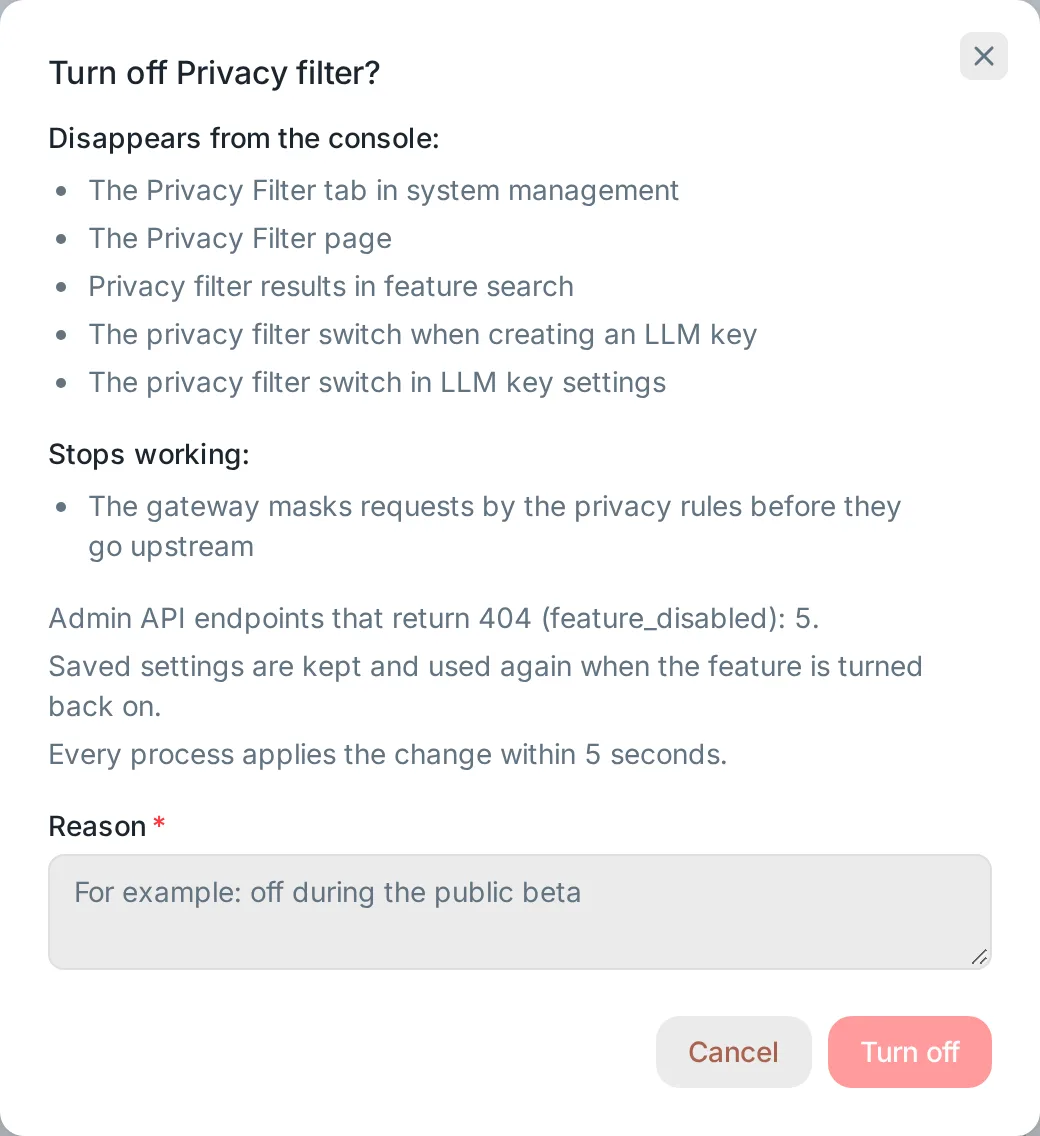 Feature flag toggle confirmation dialog: impacted pages and endpoints preview with required change reasonCCHP
- Review the impact summary: Lists every console entry that will appear or disappear, the governed backend capability, and how many admin API endpoints will start returning
404(feature_disabled, error code31400) when turned off. - Enter a change reason (required): Briefly describe why you are flipping the flag (for example, “Enable bidirectional privacy obfuscation pilot for R&D” or “Disable CC Hub import after migration”). The reason is written to both configuration publish history and the
feature_flag.updateaudit log. - Confirm and publish: The backend publishes only that single flag atomically in one transaction with its audit record, without sweeping in unrelated draft changes.
5-second cluster propagation, data retention, and rollback#
- 5-second propagation guarantee: Once published, the control plane broadcasts the revision over Dragonfly immediately. All running
gateway,control,worker, andcronprocesses (polling snapshots every250 ms) and open browser console tabs (receivingfeature_flags.changedover the live stream) typically converge under 1 second and always within 5 seconds, with zero restarts. - Turning off preserves all data: Disabling a flag leaves every saved rule, setting, and history record intact in the database; turning it back on restores everything immediately. Visiting a disabled feature’s URL directly shows a friendly “Feature disabled” notice (with a shortcut to Feature flags for platform super admins).
- Publish history and one-click rollback: Every toggle creates a standalone configuration revision that can be rolled back cleanly from configuration history or
POST /api/v1/config/rollback. Rollbacks also emit afeature_flag.updateaudit entry marked with sourcerollback. - Fail-safe degradation: If the configuration database is briefly unreachable, running processes retain their last known flag values and mark state
STALE, never accidentally enabling or disabling gated features due to a transient outage.
Maintenance mode and console display settings#
Below the flag list, the Feature flags page also hosts two platform-wide configuration sections—System (system.*) and Console (console.*):
- Maintenance mode: Turn on the platform-wide maintenance notice. Saving immediately refreshes the site projection so visitors see the maintenance banner.
- Console display settings: Adjust global default console behavior such as health-status visibility.
Frequently asked questions#
After turning off feature.privacy_filter or feature.error_rules, will the gateway still run existing rules?#
No. Once the change propagates to the gateway within 5 seconds, runtime processing skips that stage and records the skipped stage and rule count under features_disabled in the request decision summary. Your saved rules stay intact and resume automatically if you turn the flag back on.
Why are feature.import_sub2api and feature.import_new_api grayed out?#
Both flags are in the planned stage to give operators visibility into upcoming migration importers; backend implementation is not yet enabled, so they cannot be toggled until those capabilities ship.